Home Seupra AI RankBot install Article
Activate Seupra AI search bot clickers: Free License
Posted on 2025-07-05 Updated on 2026-02-02How to Activate the Free License
Seupra's free license is completely free forever. It supports:
- Unlimited installations on any number of computers
- Unlimited domains for all users
To activate it, follow these three steps:
Step 1 - Start the Free License Setup
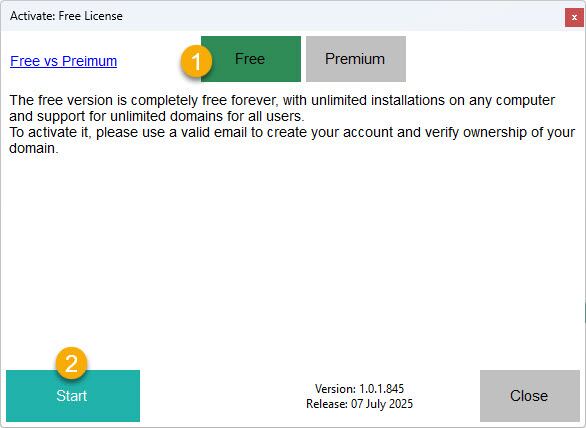
- Open the activation window in Seupra.
- Select the Free option.
- Click the Start button to begin.
Step 2 - Verify Your Domain Ownership
Tip: If you cannot access your domain root, refer to the last section below.
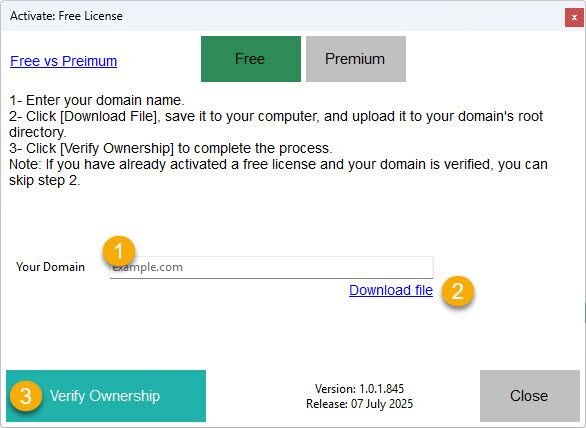
- In the field labeled Your Domain, type your website domain (e.g., example.com).
- Click the Download File link to download a verification file.
- Upload the downloaded file to your domain's root directory using FTP or your hosting file manager.
- After uploading, click Verify Ownership to confirm domain control.
Tip: If you've already activated a free license and your domain is verified, you can skip the file upload step.
Step 3 - Confirm Your Email
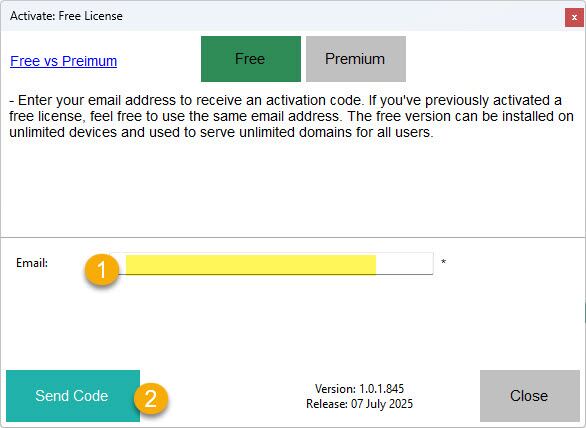
- Enter a valid email address in the field labeled Email.
- Click the Send Code button. A one-time activation code will be sent to your email.
- Check your inbox and enter the code when prompted in the app.
- Once the code is entered correctly, your free license will be immediately activated.
You can reuse the same email if you've previously registered a free license.
Step2 - Alternative: Verify domain ownership (DNS or Post)
If domain root access is unavailable (You are unable to verify your domain ownership via Step 2 above), click: I cannot access my domain root and choose one of the following two methods. You only need to complete one option, and after verification is done, you may safely remove it from your domain:

Option 1: By domain registrar
- Go to your domain registrar (where you manage your domain DNS).
- Add a new CNAME or TXT record containing the unique code we generated for you.
- Once the record is added and propagated, click "Verify Ownership".
Option 2: By a custom Page or Page
- Create a new page or post on your domain.
- Inside the content, simply paste the verification code.
- After the page is live, back to the activation window, paste its URL then click "Verify Ownership".
✅ After successful authorization, you may remove the record or page at any time.
To learn more about Seupra AI RankBot, visit seupra.com
Found this article helpful?
[ 200 Out of 211 Found Helpful ]